





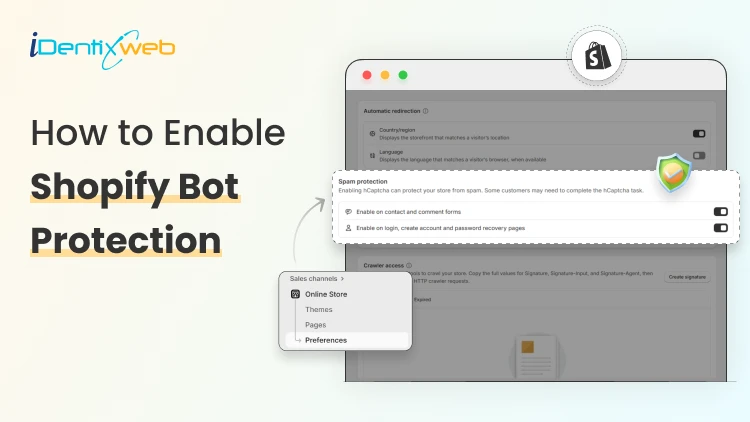

To enable Shopify bot protection, enable its built-in features like hCaptcha/reCAPTCHA from online store > preferences for forms. For checkout security, activate Shopify Plus Bot Protection under Settings > Bot Protection and consider third-party Shopify Apps for advanced blocking.
Have you ever noticed suspicious abandoned checkouts or unusual spikes in your cart? To get rid of this, many built-in features are available that detect and block these bots before they cause any damage.
In this article, you will learn how to set up Shopify bot protection in your Shopify store, including how it works, the benefits of activating bot protection and steps to reduce bot impact in your store.
What is a Shopify bot?
A Shopify bot is a software that automatically performs tasks on an online store. Some bots are helpful, such as chatbots that answer customer questions or suggest products, or help recover abandoned carts. Others are designed to buy limited-edition products very quickly, which can make it difficult or impossible for regular customers to complete a purchase.
How to protect your Shopify store from bots?
You can implement the following strategies to reduce the impact of bots in your Shopify store:
Activate hCaptcha in your store
Ensure that hCaptcha is enabled in your Shopify store to limit the spam bot activities in your store. hCaptcha helps you to protect the high-risk areas like contact forms, comment sections and customer account pages by verifying human interactions. Follow the steps below to enable hCaptcha in your store:
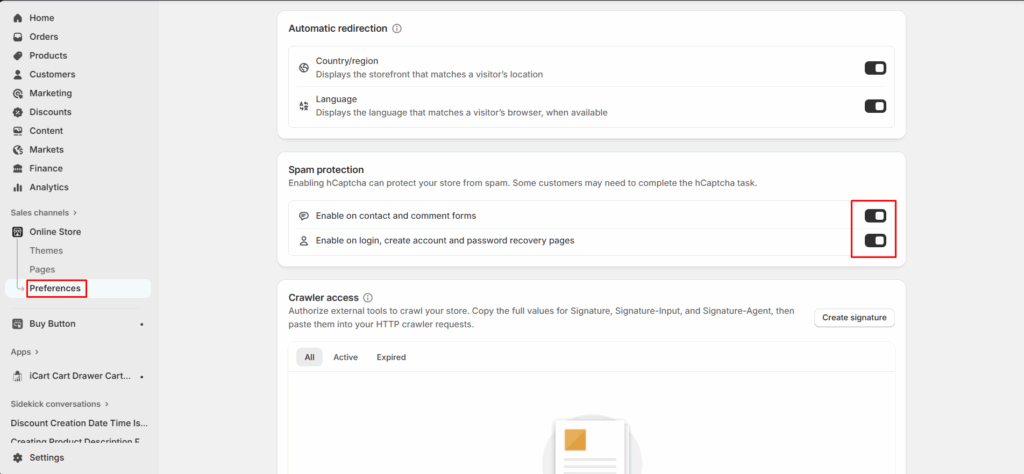
Step 1: Login to your Shopify admin and go to online store > preferences.
Step 2: Check for the Spam protection section and from there enable the hCaptcha for that location:
Keep your theme and apps up to date
Ensure that you regularly update your Shopify apps and themes to ensure your store has the latest updates and security improvements.
Monitor traffic and behavior patterns
Track your store’s traffic trends and pattern of customer behavior using Shopify analytics or Google Analytics. If you find a sudden spike or any unusual activity like high page views or traffic, then analyze the metrics and identify the issue at an early stage.
Implement order risk assessment
To reduce order risk, you need to adopt a fraud prevention strategy by reviewing Shopify’s order risk analysis. By doing this, it will help you to identify any major risks before orders are fulfilled.
Educate your staff
Make sure your team members who are managing your store also have knowledge of what Shopify bot activities look like and how they will affect your store’s performance.
Why You Should Add Shopify Bot Protection to Your Store
Prevent checkout abandonment & fake orders
Malicious bots target stores by adding fake orders, creating fake checkout sessions. But if Shopify bot protection is enabled, it helps to identify and block this suspicious activity before it reaches to your checkout page and reduces failed transactions.
Protect your inventory
Bots can sometimes increase the quantity of products in your cart and leave the cart abandon without completing the purchase. Sometimes it makes your items appear out of stock. So, if you enable bot protection your customers won’t face this issue of artificial product scarcity from your store.
Improve Store Performance and Stability
Automated traffic consumes server resources and can slow down your store during high-traffic periods. By filtering bot traffic at the platform level, Shopify bot protection helps maintain fast page load times and a reliable shopping experience.
Reduce Fraud and Security Risks
Bots are commonly used for credential stuffing, scraping customer data, and probing for vulnerabilities. Shopify bot protection works alongside Shopify’s built-in security and fraud analysis tools to minimize these risks.
Protect Brand Reputation and Trust
Frequent fraud attempts, site slowdowns, or checkout failures can damage customer trust. Bot protection helps ensure a secure, professional storefront that customers feel confident purchasing from.
Frequently Asked Questions
1. What are Shopify bots?
Bots are automated programs that interact with Shopify stores to perform actions such as scraping product data, abusing checkout, hoarding inventory, or attempting fraudulent transactions.
2. Can bots affect Shopify checkout and payments?
Yes. Bots can target checkout pages for card testing, fake orders, and abandoned checkouts, which may lead to payment failures, higher fraud risk, and chargebacks. But if you have added Shopify bot protection in your store, you can reduce these risks.
3. How to protect a Shopify store from bots?
You can protect your Shopify store from bots by enabling built-in security features such as bot protection, hCaptcha, and fraud analysis, keeping your theme and apps updated, monitoring traffic analytics, and using checkout protection if you are on Shopify Plus.


About the author
Sajini Annie John
Meet Sajini, a seasoned technical content writer with a passion for e-commerce and expertise in Shopify. She is committed to helping online businesses to thrive through the power of well-crafted content.