







Designing a high-converting online store isn’t just about picking a theme and adding products. It’s about creating a seamless shopping experience that guides visitors from first click to checkout.
In this step-by-step guide, you will learn exactly how to design Shopify store from the ground up, covering everything from initial setup and visual branding to user experience best practices and essential features. By the end, you’ll have a solid foundation to create a store that not only looks great but also drives sales.
Steps to Design Shopify Store
Step 1: Build Your Brand Foundation First
Most merchants make the mistake of jumping straight into Shopify and picking a theme. Don't do this. Your brand foundation - your colors, fonts, tone, and visual style must come before you choose a theme. Otherwise, you're just decorating a store that has no identity.
Define Your Brand Identity
Answer these three questions honestly:
1. Who is your ideal customer? Not "everyone who might buy this." Be specific. A 28-year-old fitness enthusiast shopping on her phone during lunch has completely different expectations than a 55-year-old home décor buyer browsing on a desktop on Sunday morning.
2. What feeling do you want people to get when they land on your store? Trustworthy and professional? Fun and energetic? Luxury and exclusive? The answer shapes every design decision - your colors, your fonts, your photography style.
3. What makes you different from the three closest competitors? Your design should visually communicate that difference. If everyone in your niche uses clean white minimalism, maybe your store should lead with bold color and personality.
Step 2: Choose the Right Shopify Theme
Your theme is the structural skeleton of your store. A bad theme choice can hold you back for months. A great one can be customized into almost anything you want. There are many best free horizon themes and even paid themes you can use as per your choice.
Free Themes
Free themes from the Shopify Theme Store (Dawn, Craft, Sense, etc.) are genuinely good. Dawn, in particular, is fast, clean, and highly customizable. If you're starting out or on a tight budget, free themes are absolutely viable.
Paid themes
Paid themes ($150–$400 one-time) from providers like Prestige, Impulse, Symmetry, or Turbo offer more built-in features, more layout options, and often better out-of-the-box design quality. If your shopify store design goals require advanced animations, mega menus, or complex product layouts, a paid theme can save you hours of custom work.
How to Evaluate a Theme Before Buying
Don't judge a theme by its demo. Judge it by these criteria:
- Speed score - Check PageSpeed Insights on the theme's live demo. Above 70 on mobile is acceptable; above 85 is excellent.
- Mobile experience - Browse the demo on your actual phone. Does it feel smooth?
- Customization flexibility - How many sections and blocks does it offer? Can you build the homepage structure you actually want without code?
- Industry fit - Is the theme built for stores like yours? A fashion theme and a supplement theme have very different conversion-focused layouts.
Step 3: Configure Your Shopify Theme Editor
Once you've installed your theme, it's time to open the Theme Editor (Online Store > Themes > Edit theme). This is where the real work begins.
Set Up Your Global Brand Settings First
Before touching individual pages, go to Theme Settings and configure:
- Colors - Input your exact brand color hex codes here. Apply your primary color to buttons, links, and accents.
- Typography - Set your heading and body fonts here. This applies site-wide.
- Buttons - Set button shape (rounded vs. sharp), hover color, and size.
- Favicon - Upload your logo/icon as your favicon (32x32 or 64x64 PNG)
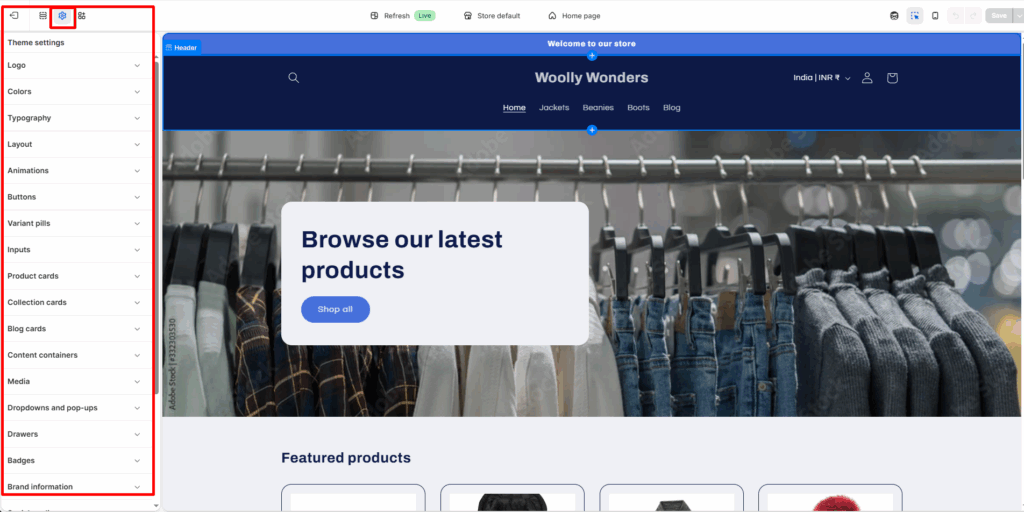
Getting these global settings right means every page you design will automatically feel on-brand.
Design Your Header
Your header is the first thing every visitor sees on every page. It needs to:
- Show your logo clearly
- Give easy access to navigation
- Surface the cart icon
- On mobile: collapse into a clean hamburger menu
Sticky header tip: Enable a sticky header so your navigation follows users as they scroll. This keeps your cart icon and menu accessible at all times, which directly impacts add-to-cart rates.
Design Your Footer
Your footer is where trust-building happens quietly. Include:
- Navigation links (policies, about, contact, FAQ)
- Payment method icons
- Social media links
- Email signup (if applicable)
- Copyright notice
A well-designed footer reduces customer service questions because it makes policies and contacts easy to find.
Design your Shopify store with experts
Step 4: Build a High-Converting Homepage
The first step when you design Shopify store includes designing from home page to checkout. Your homepage is your digital storefront window. It has one job: convince visitors to keep shopping.
Here's the structure used by high-performing Shopify stores:
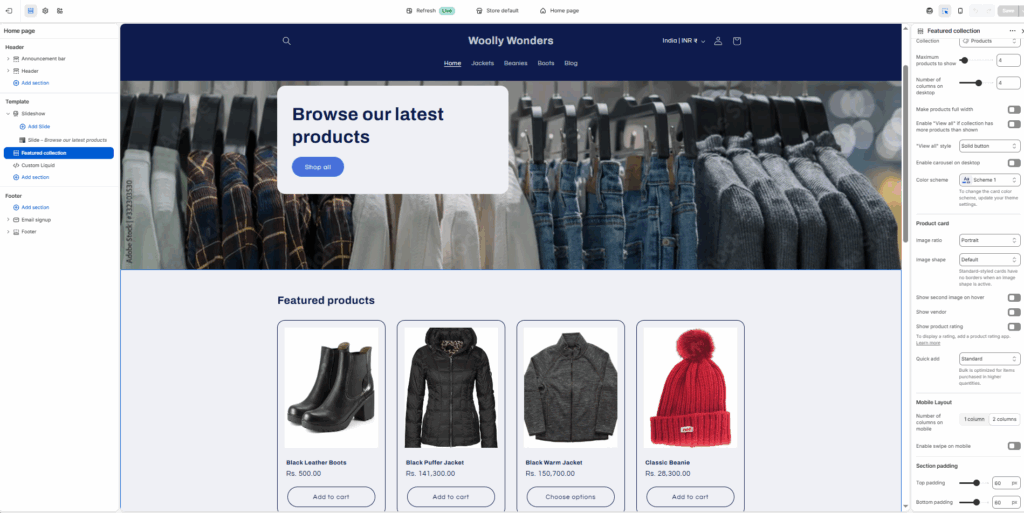
Section 1: Hero Banner
Your hero is the first thing visitors see. It needs to communicate:
- What you sell - Don't make people guess
- Who it's for - Make your customer feel seen
- Why they should care - Lead with a benefit, not a product name
- A clear CTA - One primary button ("Shop Now," "Explore Collection," "Get Yours")
Use a full-width image or video background with overlaid headline text. Keep headline copy short and punchy - 5 to 10 words maximum.
Avoid the generic: "Welcome to our store" is one of the worst hero headlines in ecommerce. Be specific. "Skincare That Actually Works for Sensitive Skin" is 100x more powerful.
Section 2: Featured Products or Bestsellers
Highlight your 4-8 top products. Use clean product cards with:
- High-quality product image (multiple angles if possible)
- Product name
- Price
- Star rating (if you have reviews)
- Quick "Add to Cart" on hover (supported by most modern themes)
Section 3: Social Proof / Trust Builder
Before people buy from a store they've never heard of, they look for proof that others have. Add one of these:
- A press mention bar ("As seen in…")
- A row of 5-star review snippets
- A customer count or testimonial
Put this early in the page ideally above the fold on desktop. Don't bury your trust signals at the bottom where nobody scrolls.
This is what I have designed by following the above points:
Step 5: Design Your Product Pages for Conversions
If your homepage gets visitors to browse, your product page seals the deal. This is where merchants lose the most sales and where the biggest improvements live.
The Anatomy of a High-Converting Product Page
Left column (images):
- 4-6 images minimum (front, back, detail, lifestyle, scale reference)
- Zoom-on-hover functionality
- Mobile-friendly swipe gallery
Right column (details):
- Product name (clear, descriptive)
- Price (prominent - don't make people look for it)
- Short benefit-focused description above the fold
- Variant selector (size, color, etc.)
- Quantity selector
- Add to Cart button - large, high-contrast, unmissable
- Payment trust icons (Visa, Mastercard, PayPal, etc.)
- Shipping/returns summary (2–3 lines, reassuring)
Below the fold:
- Full product description with benefits + features
- Size guide (if applicable)
- Customer reviews section
- Recently viewed / related products
Step 6: Set Up Core Supporting Pages
These pages don't get the attention they deserve, but they quietly build trust and reduce abandoned carts.
About Page
Shoppers visit your About page more than you think. This is where you build the human connection. Tell your real story, why you started, who you're serving, and what you believe in. Include a real photo of yourself or your team. People buy from people.
Contact Page
Make it effortless to reach you. Include:
- Contact form
- Email address
- Response time expectation ("We reply within 24 hours")
- Optional: live chat
Policy Pages
Shopify auto-generates templates for these - customize them to match your brand voice:
- Shipping Policy - Clear timelines, costs, and carriers
- Return/Refund Policy - Be generous where you can; it builds trust
- Privacy Policy - Required. Use Shopify's generator as a starting point.
- Terms of Service - Required for legal protection.
Customers read these before buying, especially on unfamiliar stores. Clear, human-written policies convert better than legal jargon.
Over 70% of Shopify traffic comes from mobile devices. Designing for desktop first is a mistake that costs merchants real money.
Step 7: Add Trust Signals Throughout Your Store
Nobody buys from a store they don't trust. Trust signals are the design elements that silently reassure first-time visitors that you're legitimate.
Sprinkle these throughout your shopify store design:
| Trust Signal | Where to Use It |
| SSL badge / "Secure checkout" | Header, cart, checkout |
| Payment method icons | Product pages, footer, checkout |
| Customer reviews (with photos) | Product pages, homepage |
| Clear return policy callout | Product pages, cart |
| Real contact info | Footer, contact page |
| "X orders shipped" social proof | Homepage, product pages |
| Press mentions | Homepage above the fold |
| Money-back guarantee badge | Product pages |
The more unfamiliar your brand, the more trust signals you need. New stores should stack these aggressively.
When to Consider Professional Shopify Store Design Services
DIY design gets you live. Professional design gets you competitive.
If any of these apply to you, it may be worth investing in professional shopify store design services:
- You've launched but conversion rates are under 1% - A professional can identify and fix the UX issues killing your sales.
- You're scaling with paid traffic - Sending ad spend to a poorly designed store is burning money. Design ROI becomes measurable quickly.
- Your brand demands a premium look - If you're in fashion, jewelry, beauty, or luxury goods, your design is part of the product.
- You've outgrown your current theme - Custom sections, headless builds, or advanced UX flows need developer-level execution.
- You don't have time to do it right - Time has a cost. A professional can deliver in weeks what might take you months.
If you need professional shopify store design services hire designers from expert companies like us to get the best outcome you expect.
Final Thoughts
Learning how to design a Shopify store from scratch is one of the most valuable skills you can develop as a merchant. A well-designed store doesn't just look better, it actively works to convert every visitor who lands on it.
The difference between a store that does $0/month and one that does $10,000/month often isn't the product. It's the design, the trust, and the experience. Use this guide as your blueprint. Work through it step by step. And if at any point the complexity gets too much or your goals demand a truly exceptional result, don't hesitate to explore professional shopify store design services that can accelerate your growth.
Frequently Asked Questions
1. How long does it take to design Shopify store from scratch?
A basic, functional store can be live in 3-7 days if you have your brand assets ready. A polished, conversion-optimized store typically takes 2-4 weeks of focused work.
2. Do I need coding skills to design a Shopify store?
No. Shopify's theme editor is drag-and-drop and handles 90% of what most merchants need. For advanced customizations, basic Liquid (Shopify's template language) knowledge helps or you can hire a Shopify developer.
3. What's the best Shopify theme for beginners?
Dawn is the best free theme for beginners as it is fast, flexible, and well-supported. For paid options, Prestige and Impulse are merchant favorites with strong documentation.
4. Can I redesign my Shopify store without losing data?
Yes. Shopify lets you install and preview a new theme without affecting your live store. Products, orders, and customer data are stored separately from your theme.
5. What makes a good Shopify store design?
A great shopify store design is fast, mobile-friendly, visually on-brand, easy to navigate, full of trust signals, and structured to guide visitors naturally toward purchase.


About the author
Sajini Annie John
Meet Sajini, a seasoned technical content writer with a passion for e-commerce and expertise in Shopify. She is committed to helping online businesses to thrive through the power of well-crafted content.