





Many Shopify store owners use a password protected Shopify page to build anticipation before launch, offer early access to VIP customers, or create private wholesale portals. Instead of making the entire site public immediately, you can limit access and share the password only with selected users.
In this guide, you will learn how to add a Shopify Password Protect Page, how it works, and the different ways to create a Shopify password protected page for your store in 2026.
What Is a Shopify Password Protect Page?
A Shopify Password Protect Page is a security feature that restricts access to a store or page using a password. Visitors must enter the password before they can see the content. This creates a Shopify password protected store, depending on how it is configured.
What it does
It allows you to:
- Lock your entire store
- Protect exclusive content
- Restrict product access
- Create private shopping experiences
When Should You Use a Shopify Password Protected Store?
1. Before Store Launch
Many brands activate a Shopify password protected store during development. This prevents customers from seeing unfinished pages.
2. Exclusive Product Drops
Brands selling limited products often create a password protected Shopify page for early access. Only customers with the password can buy the product.
3. Wholesale Stores
Some Shopify businesses run private wholesale storefronts. A password-protected page ensures only approved buyers can enter.
4. Internal Testing
Developers frequently enable a Shopify password protected page to test design changes without exposing them publicly.
How to Add a Shopify Password Protect Page (Step-by-Step)
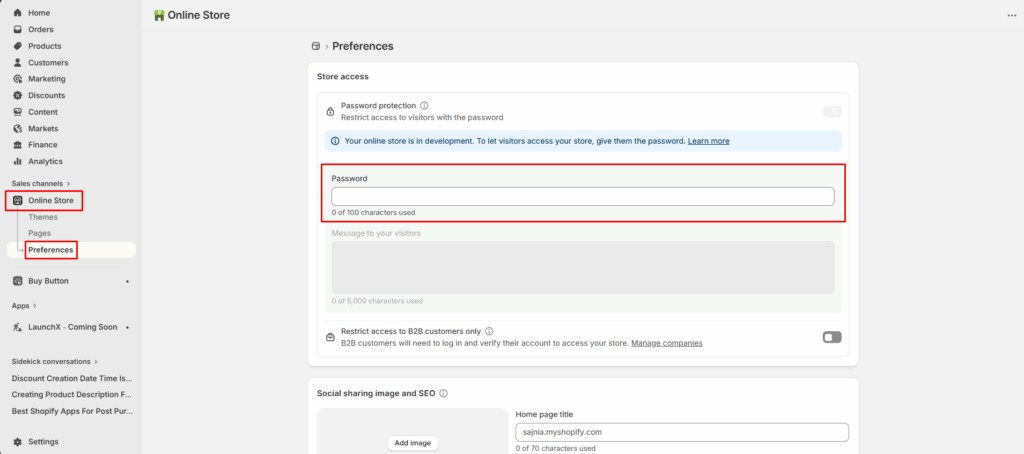
- Go to your Shopify dashboard.
- Then navigate to online store > preferences
What if you want to add an attractive password-protected coming soon landing page with more options? Yes, it’s possible with LaunchX Shopify app.
- Go to Shopify app store & install LaunchX - Under Construction app.
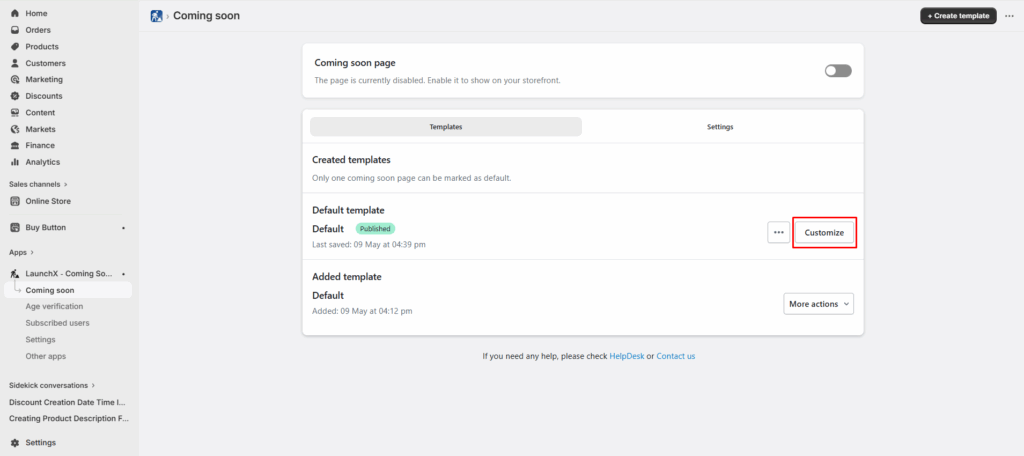
- After installing the app, complete the onboarding process, go to coming soon option and click on the “Customize” button.
- Go to general settings and click on password.
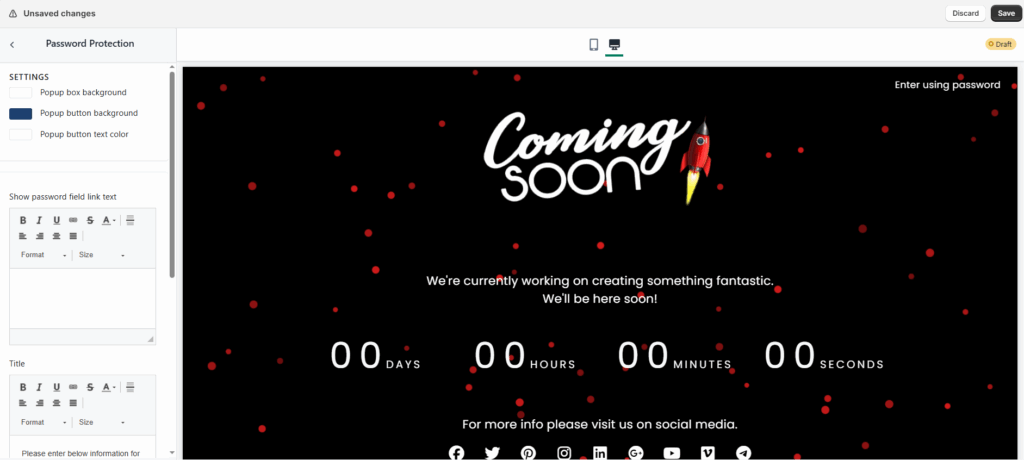
As you can see in the above screenshot, that page not just contain password protection but many elements like countdown timer of when your store will be launched, social media icons, custom text, background and many more.
Advantages of Using a Shopify Password Protect Page
It helps store owners control who can access their store or specific content. It is a practical feature for launches, private sales, and development phases. Below are the main advantages of using a Shopify password protected page.
1. Keeps Your Store Private Before Launch
You can develop your website, add products, and test features without customers seeing incomplete pages. During this phase, your Shopify password protected store ensures that only people with the password can access the site.
2. Enables Exclusive Product Launches
Many brands use a password protected Shopify page for limited product releases. By sharing the password only with selected customers, you can create exclusive shopping experiences.
This strategy works well for:
- VIP product launches
- Early access sales
- Limited-edition product drops
3. Improves Store Security
A password protected page adds an extra layer of security to your store. Unauthorized visitors cannot access restricted pages without entering the correct password.
This is useful for protecting:
- Confidential product pages
- Wholesale pricing
- Private collections
4. Allows Private Wholesale Access
Many B2B stores run a Shopify password protected store specifically for wholesale buyers. Instead of showing wholesale pricing to everyone, store owners can restrict access using a Shopify Password Protect Page. Only approved retailers or partners who have the password can enter the store and place orders.
5. Helps Test Store Features Safely
Before launching new features or redesigning your store, developers often enable a Shopify password protected page. It prevents customers from experiencing unfinished updates.
This allows internal teams to test:
- New themes
- Checkout flows
- App integrations
- Product pages
6. Builds Anticipation for Your Launch
Another advantage of a Shopify password protected page is that it can act as a “coming soon” page. Many brands customize with:
- Launch countdown timers
- Email signup forms
- Brand messaging
This helps collect leads while your Shopify password protected store prepares for launch.
Final Thoughts
A Shopify Password Protect Page is a simple but powerful tool for controlling store access. Whether you want a Shopify password protected store before launch or a password protected Shopify page for exclusive content, Shopify provides several ways to implement it.
The easiest approach is enabling store-level protection through Shopify settings. For page-level protection, apps or custom code are typically required.
When used strategically, a Shopify password protected page can help brands create exclusive shopping experiences, manage private sales, and launch products with controlled access.
Frequently Asked Questions
1. What is a Shopify Password Protect Page?
It is a feature that restricts access to your store or certain content by requiring visitors to enter a password. When enabled, customers must enter the correct password before they can view your Shopify password protected store or access a password protected Shopify page.
2. Can I create a password protected Shopify page instead of locking the entire store?
By default, Shopify protects the entire store rather than individual pages. However, you can create a password protected page using Shopify apps, customer login restrictions, or custom code. These methods allow you to restrict access to specific pages instead of the whole Shopify password protected store.
3. Does a Shopify password protected store affect SEO?
Yes. When a Shopify password protected store is enabled, search engines cannot crawl or index your website pages. This means your products and content will not appear in search results until the Shopify Password Protect Page is disabled.
4. Can customers still place orders on a password protected Shopify page?
Yes, customers who enter the correct password can browse the store and place orders normally.

![Small Businesses Need These Cheap Shopify Themes [Low Cost Themes for 2026]](https://www.identixweb.com/wp-content/uploads/2026/03/03-03-Tue-Blog-Best-Budget-friendly-Shopify-Themes-for-Startups.webp "Small Businesses Need These Cheap Shopify Themes [Low Cost Themes for 2026]")

About the author
Sajini Annie John
Meet Sajini, a seasoned technical content writer with a passion for e-commerce and expertise in Shopify. She is committed to helping online businesses to thrive through the power of well-crafted content.