





Selling internationally has never been easier but converting international visitors is still where most Shopify stores struggle.
You can drive traffic from the US, Europe, Australia, and Asia all day long. But if shoppers land on your store and see prices in a foreign currency, you’re introducing friction before they even reach the cart. That friction often translates directly into lost sales.
This is where Shopify multicurrency carts come in and why many global brands see up to a 10% increase in international sales after enabling them.
Let’s break down why this happens, how Shopify multicurrency works, and how you can use it strategically to unlock more global revenue.
What Is Shopify Multicurrency and How It Works
Shopify multicurrency allows you to display prices, accept payments, and process checkout in a customer’s local currency.
How it works in practice:
- Shopify detects the shopper’s location (via IP or browser settings)
- Prices automatically display in the local currency
- Checkout, payment, and confirmation happen in the same currency
This functionality is powered through Shopify Payments and is often paired with Shopify Markets for advanced regional controls.
Why Shoppers Prefer Buying in Their Local Currency
Buying online already requires trust. Buying from an international store raises the stakes even higher.
When shoppers see prices in a foreign currency, several doubts immediately creep in:
- “Is this actually expensive in my currency?”
- “Will I get charged extra conversion fees?”
- “What will my bank statement show?”
Here’s why local currency makes such a difference:
1. Less Mind Calculation
Shoppers don’t want to calculate exchange rates especially on mobile. Showing prices in local currency removes that cognitive load and keeps users focused on buying, not calculating.
2. Higher Trust and Transparency
Local currency pricing signals that your store is prepared to serve international customers. It reassures buyers that:
- Pricing is fair
- Checkout totals won’t change unexpectedly
- Refunds will be straightforward
3. Familiar Price Anchoring
A product priced at €49 feels very different from $52.37, even if the value is similar. Shoppers judge prices based on what feels “normal” in their own market.
Multicurrency carts help increase global sales because they remove one of the biggest barriers to buying online: price uncertainty.
When international shoppers see prices in a foreign currency, many hesitate or abandon the cart. A multicurrency cart eliminates that hesitation by showing prices and processing payments in the shopper’s local currency making the buying decision faster and more comfortable.
That smoother experience often translates into higher conversion rates, which is why many Shopify stores see sales lift by up to 10% from international traffic.
Key Reasons Multicurrency Carts Boost Sales
- Higher Conversion Rates
Shoppers understand the price instantly, without doing currency math. Less thinking = more buying. - Reduced Cart Abandonment
No surprises at checkout means fewer drop-offs at the final step. - Increased Trust in the Brand
Local currency pricing makes your store feel legitimate and customer-friendly. - Better Mobile Shopping Experience
Mobile users are especially sensitive to friction. Multicurrency keeps checkout quick and simple. - More Confident First-Time Buyers
International shoppers are more likely to complete their first purchase when pricing feels familiar.
Simple Example
Imagine a customer in Germany:
- Store A shows prices only in USD
- Store B shows prices in EUR, including checkout
Even if both sell the same product, store B feels easier and safer to buy from, and that’s often enough to win the sale.
How to Enable Multicurrency in a Shopify Store
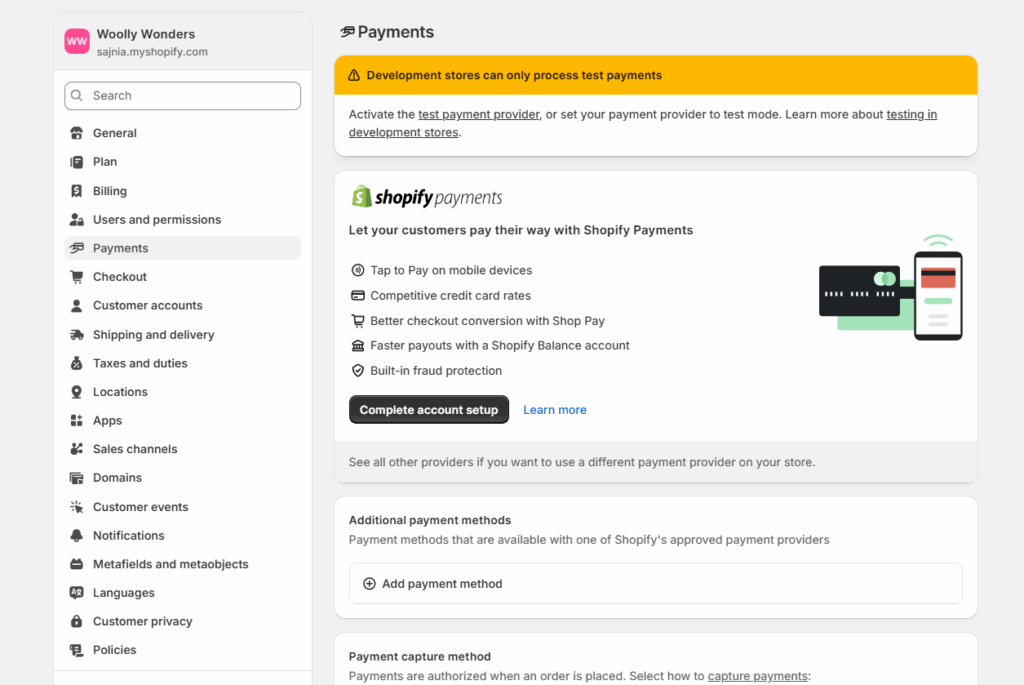
Step 1: Enable Shopify Payments (Mandatory)
- Go to Shopify Admin > Settings > Payments
- Under Shopify Payments, click “complete account setup” (if not already enabled).
- After enabling Shopify payments, you can move to the currency setup.
Step 2: Add supported currencies
- Navigate to Settings > General and click on “Markets”.
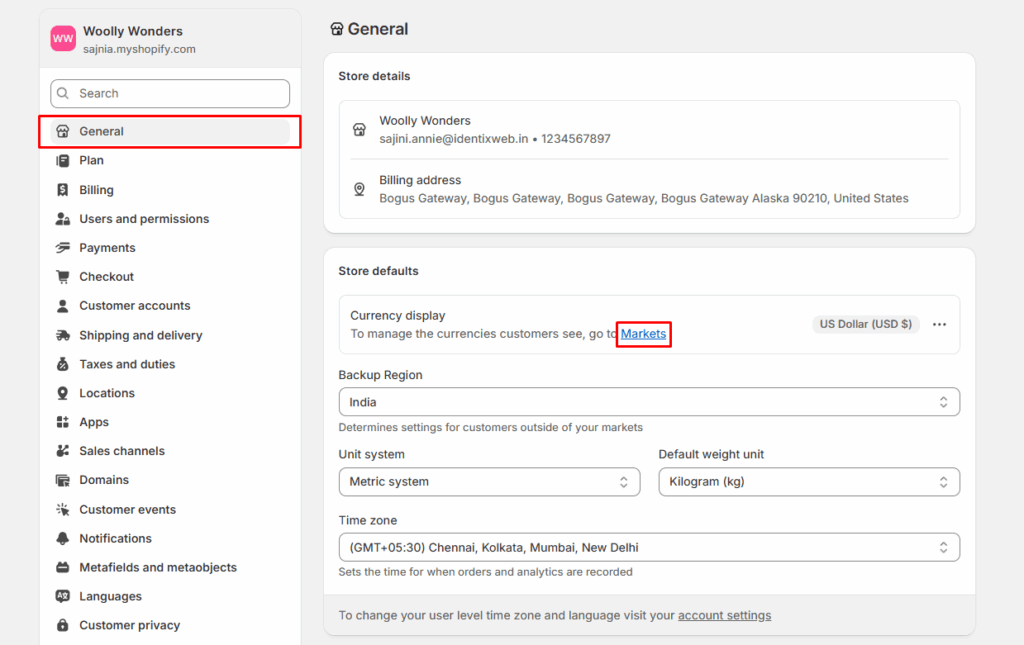
- You’ll see your primary market (usually your home country). If you want to change the primary market, you can do that too.
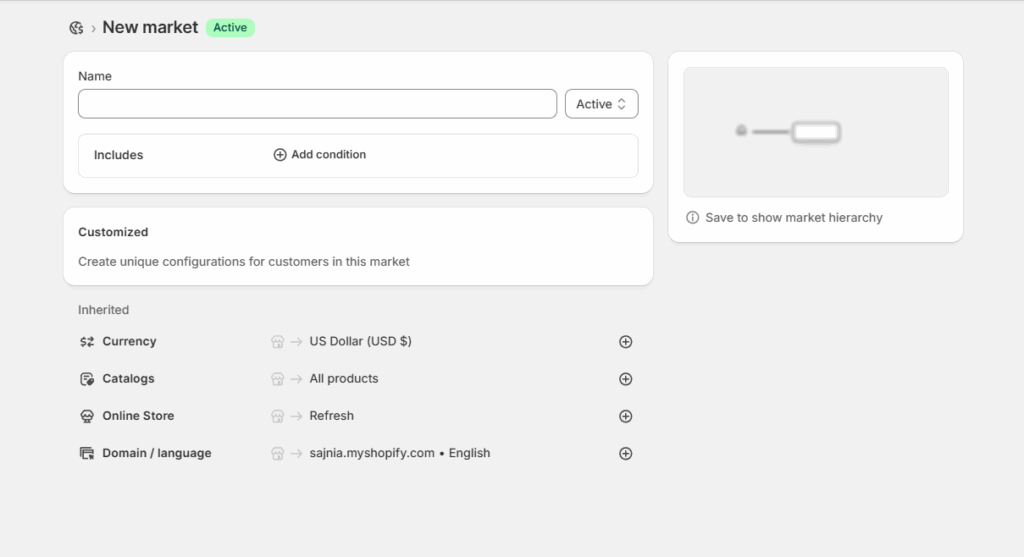
- Click on “Create Market” to create new regions and add currencies for those markets.
Step 3: Customize how prices need to be displayed
- Customize how prices appear for each currency.
- Add products to which you want to enable this feature.
Step 4: Add a currency selector
- Check whether your theme allows this or not.
- If not possible through your theme, then install any app from the Shopify app store.
Step 5: Test Everything
- Product pages show local currency
- Cart matches the same currency
- Checkout stays in the same currency
- Order confirmation emails display the correct currency
Conclusion
Setting up multicurrency in your Shopify store is one of the simplest yet most effective ways to improve the international shopping experience. By showing prices in your customers’ local currency and keeping that consistency through checkout, you remove confusion, build trust, and make purchasing feel effortless.
For stores already attracting global traffic, multicurrency helps convert more visitors into buyers often resulting in a noticeable lift in international sales. When combined with the right markets, payment methods, and pricing rules, Shopify multicurrency becomes a powerful growth tool for scaling your store globally.
People Also Ask
1. What is Shopify multicurrency?
Shopify multicurrency allows you to display prices, accept payments, and complete checkout in a customer’s local currency. It helps international shoppers understand pricing easily and reduces checkout friction.
2. Is Shopify multicurrency available on all plans?
Shopify multicurrency is available on most Shopify plans, but it requires Shopify Payments to be enabled. Some advanced features may vary by plan and region.
3. Do I need a currency converter app if I use Shopify multicurrency?
No. Shopify multicurrency handles pricing and checkout natively. Currency converter apps usually only change price display and can cause confusion at checkout.
4. Can I set different prices for different countries?
Yes. Using Shopify Markets, you can apply price adjustments, rounding rules, or region-specific pricing strategies for different countries or markets.
Post Tags



About the author
Sajini Annie John
Meet Sajini, a seasoned technical content writer with a passion for e-commerce and expertise in Shopify. She is committed to helping online businesses to thrive through the power of well-crafted content.