





Finding the best local delivery app for Shopify stores to rely on is no longer optional - It is important for all Shopify merchants. For those Shopify stores that offer same-day delivery, in-store pickup & shipping, sometimes meeting customer expectations can become complicated. But picking up the right local delivery Shopify app can directly impact your store’s conversions and order accuracy.
In this comparison, let’s break down their features, pricing, use cases and more to help you decide which solution is the perfect fit for your business needs.
Who is this comparison for?
This comparison is especially useful if you:
- Manage time-sensitive orders (food, florist, grocery, bakery, retail)
- Offer local delivery, in-store pickup, or scheduled shipping
- Want to reduce fulfillment errors, support tickets, and missed delivery windows
Why does this comparison matter?
Choosing the right local delivery app for Shopify directly impacts how smoothly your store handles delivery and pickup orders. Small differences in features and flexibility can affect both customer experience and daily operations.
Most Shopify apps look similar at first, but many struggle due to the shortage of some features like accurate delivery dates, lack of pickup options, non-transparent estimated delivery dates & more. And the result? Poor order management, frustrated customers, missed order deliveries, etc.
Common Delivery Problems Shopify Stores Face
Many Shopify merchants struggle with delivery and pickup workflows as soon as order volume increases. Common issues include:
- Customers do not know when their order will arrive
- Missed or incorrect delivery windows
- Manual coordination between orders, routes, and staff
- Limited checkout customization for delivery dates
- Confusion between pickup, delivery, and shipping orders
- These problems directly affect customer satisfaction, internal efficiency, and repeat purchases.
What Most Local Delivery Apps Miss
At first glance, many local delivery apps appear similar. However, several gaps tend to emerge after implementation:
- No checkout-level delivery date selection, especially on Shopify Plus
- Lack of transparent estimated delivery dates, leading to customer confusion
- Weak order editing and fulfillment controls
- Limited flexibility for complex delivery rules (product-based, ZIP-based, or method-based)
- Poor visibility into delivery schedules for internal teams
Side-by-Side Feature Comparison: Stellar Delivery vs Bird Pickup
| Features | Stellar | Bird |
| Shopify PlusCheckout Optimization | ✔ | ✖ |
| Estimated Delivery Date & Time | ✔ | ✖ |
| No developersetup required | ✔ | ✔ |
| Advanced delivery rules(product/ZIP/method) | ✔ | ✔ |
| Multi-locationdelivery management | ✔ | ✔ |
| Shipping integrations(FedEx, UPS) | ✖ | ✖ |
| Advanced ordercontrols & edits | ✔ | ✖ |
| Advanced analytics& reporting | ✖ | ✖ |
A Simple Tick-List for Choosing Stellar Delivery Date & Pickup
✔ Let customers select delivery or pickup dates at product, cart, or checkout
✔ Offer local delivery, store pickup, and shipping options in one app
✔ Display estimated delivery dates and times to reduce support inquiries
✔ Flexible order scheduling calendar for smooth fulfillment planning
✔ Shopify Plus compatible: show the delivery calendar directly on checkout
✔ Translate the delivery date calendar into your store’s language for global customers
✔ Schedule deliveries seamlessly with an intuitive route planner
✔ Minimize operational mistakes and missed delivery windows
✔ Launch quickly - no developer setup required
✔ Perfect for food, florist, grocery, and bakery stores managing in-store pickup and delivery
A Quick Recap Before You Decide
- The problem: Shopify merchants struggle with delivery clarity, scheduling accuracy, and operational efficiency
- What matters most: Checkout-level visibility, flexible scheduling, and reliable order management
- Why Stellar fits: It addresses these challenges directly with delivery date control, pickup flexibility, and Shopify Plus compatibility
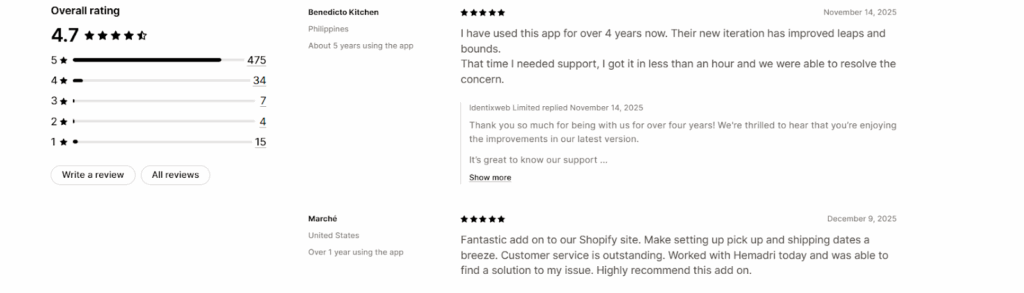
Real Feedback, Real Impact
Ready to Upgrade Your Order Management Experience?
Frequently Asked Questions
1. Does Stellar work with Shopify Plus and POS?
Yes. Stellar Delivery Date & Pickup supports Shopify Plus and can display the delivery calendar directly on checkout. It also integrates with POS for seamless in-store pickup management.
2. Which types of stores benefit most from Stellar?
The app is ideal for food, florist, grocery, and bakery stores that manage local delivery and in-store pickup, but it can work for any Shopify store offering scheduled delivery or pickup.
3. Do I need a developer to set it up?
No. The app is designed to be ready-to-use with minimal setup, automated rules, and no custom coding required.
4. Can I translate the delivery calendar for my store’s language?
Absolutely. You can customize the delivery date calendar text to match your store’s language and localize the experience for international customers.

![The Only Easter Marketing Ideas for Shopify Stores [Proven Strategies]](https://www.identixweb.com/wp-content/uploads/2026/02/24-02-Tue-Blog-Tips-Tools-for-Shopify-Stores-to-Boost-Easter-Sales.webp "The Only Easter Marketing Ideas for Shopify Stores [Proven Strategies]")

About the author
Sajini Annie John
Meet Sajini, a seasoned technical content writer with a passion for e-commerce and expertise in Shopify. She is committed to helping online businesses to thrive through the power of well-crafted content.