





You can set up multiple stores with Shopify by creating each store under the same Shopify account/email and switching between them from your Shopify admin. Each store operates independently, so you’ll configure themes, products, payments, and shipping separately.
If you are planning to manage multiple brands under one company, you already know the pain: one Shopify store can’t do everything.
What you need is a dedicated store for US buyers, another for India, or one for retail and another for wholesale clients.
This is where merchants like you should think about running multiple Shopify stores.
This guide gives you a clear, step-by-step framework to set up and manage multiple Shopify stores without losing control or performance.
Some quick FAQs before we start with the guide
- Can you have multiple stores on Shopify?
Yes. Shopify helps merchants create multiple stores on the Shopify platform.
- Do I need Shopify Standard or Shopify Plus to create multiple storefronts?
You can technically create multiple separate Shopify stores on any paid plan. Shopify Plus becomes more relevant when you want centralized control and scale (like managing many stores from one organization admin and using Shopify Markets), so it’s recommended once you’re handling larger volumes.
You can create multiple Shopify storefronts with a single admin in 5 simple steps.
How to Create Multiple Stores on Shopify in 5 Simple Steps?
Step 1: Log in to your Shopify store
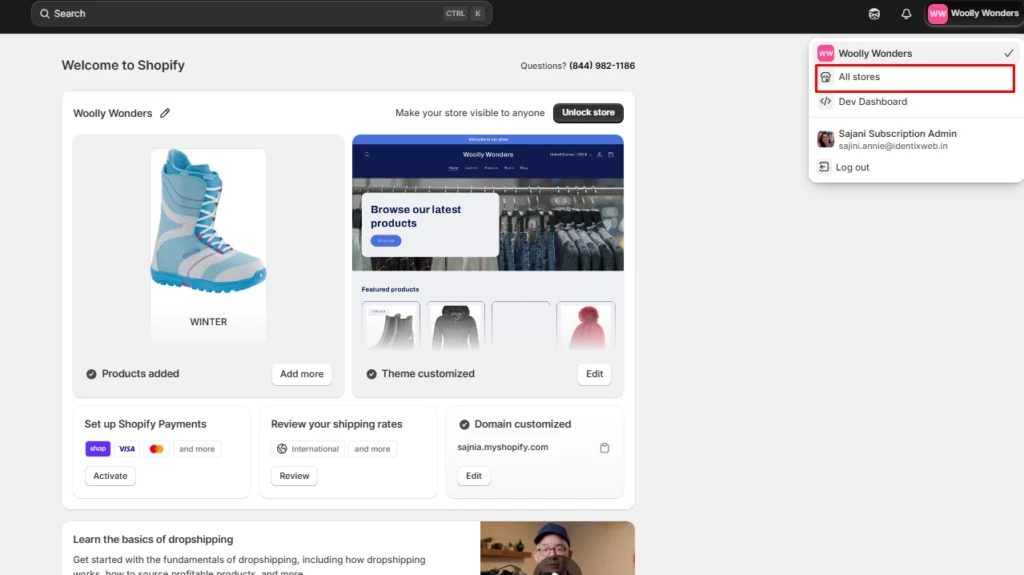
Log in to your Shopify store and navigate to the All stores option in the top-right corner of your admin page.
Step 2: Click on Create store
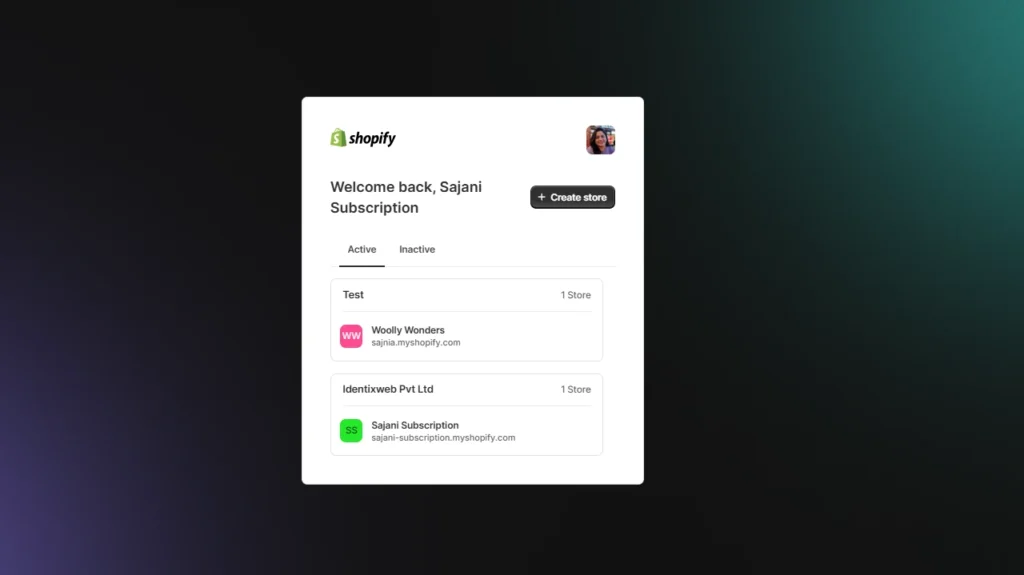
Here you will see your active stores. To create another store, click on ‘+Create store’. Here you can already see there are two active stores.
Step 3: Follow the set-up process
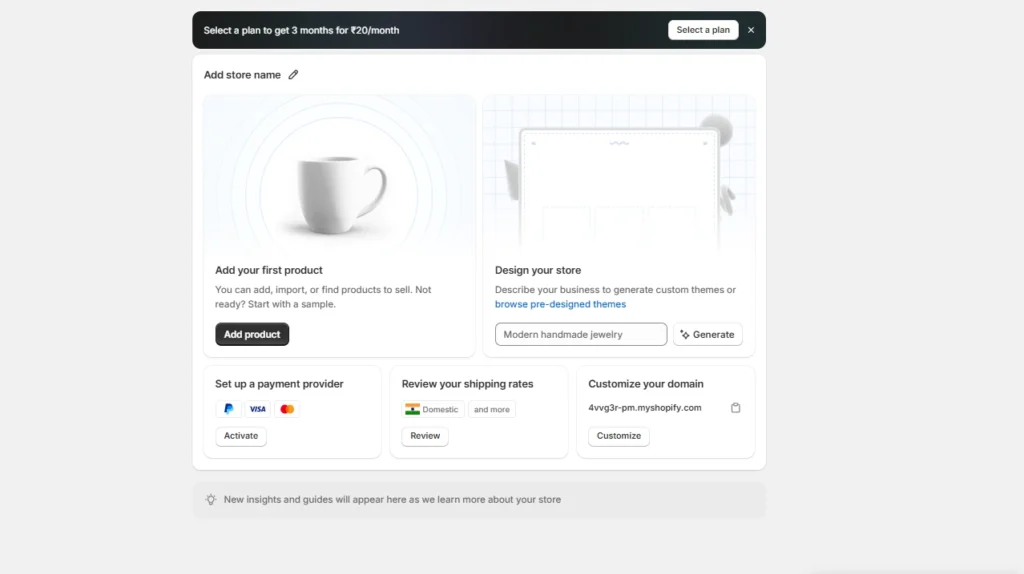
You can skip through the payment process and will be redirected towards your new store. Here you can add your store name, your first product, customize your domain, and design your store.
You can access all the features in your 3-day Shopify trial. After that, you need to select your Shopify plan.
Step 4: Email address verification
This is done for security reasons. Shopify will verify your email address for every new store you create.
Step 5: Continue with more stores
Continue the same process to create multiple shops on Shopify with the same Shopify account.
What to keep in mind before running multiple shops on Shopify?
1. Decide the purpose of each store
Before launching multiple stores, clearly define why each store exists. Whether it’s for a new region, a separate brand, or a dedicated B2B channel, every store should have a distinct objective.
2. Confirm your domain strategy
Choose how each store will be identified online. Separate domains for different brands or subdomains for specific regions. A well-planned domain structure improves SEO clarity, user trust, and long-term scalability.
3. Decide which Shopify plan you need
Evaluate whether your business needs Shopify Plus or another advanced plan for each store. Your choice should align with your short-term and long-term goals.
4. Plan your inventory & data architecture
Decide how product data, stock levels, and orders will flow across stores. You can manage them independently through Shopify admin or centralize them using an ERP or third-party tools.
Benefits of Opening Multiple Shopify Stores
Many of them step back from creating multiple stores, worrying about the time and effort needed to handle multiple stores, but there are a few benefits, too. Let’s see them.
Expand Internationally
Having more than one store can help you to just adjust your store’s currency, language, and products. You can easily tailor each site based on the needs of different regions, which can also be called localized marketing.
However, selling in different countries will help expand your business. The only thing you need to know while going international is to be aware of the market you are going to enter.

Targeting a Specified Market
Selling your products to different buyer groups could mean, based on age groups, B2B or B2C, and many more categories. Changing your approach to different buyers can help you sell more products widely.
Targeting different markets and buyers is an excellent way to increase your revenue. Many brands like Starbucks and McDonald's use this strategy.

Cleaner Brand Positioning
Multiple stores allow you to separate brands, product lines, or audiences without mixing them under one interface.
Each store can have its own theme, messaging, and marketing strategy for treating different stakeholders differently.
Controlled Experimentation Across Markets
With multiple stores, you can test different pricing models, product bundles, themes, or marketing strategies without affecting your main storefront.
This gives you a safe environment to experiment, learn quickly, and scale what works best for each market.
Clear B2B and B2C Differentiation
B2B and B2C customers have very different expectations, pricing structures, and purchase behaviours.
Separate stores let you create tailored catalogs, checkout rules, and customer journeys for each audience, keeping both experiences clean and optimized.
Challenges of Running Multiple Shopify Stores
Setting up multiple stores can be simple, but managing them is the actual challenge. Let’s see what the common challenges are faced by managing multiple storefronts.
Manage your orders and inventory
You need to monitor your orders and inventory as you are dealing with orders from multiple stores, not with a single store.
So sometimes it would become confusing and messy while fulfilling orders or returning orders. The same happens with inventory, i.e if any error occurs, then it can affect your production.
Managing Products
Managing products can also become messy and kinda confusing when you arrange them separately to showcase them across multiple Shopify storefronts.
What I am trying to say is that you may set priorities for your products, but it could become a challenge to manage them as you do not have one store; instead, you are going to handle multiple Shopify storefronts.
Conclusion
If you want to expand your business and make more sales, then the only option is to create different stores from different accounts, but unfortunately, Shopify doesn’t allow you to create multiple stores from one account.
FAQs
1. Can you have multiple stores on Shopify?
Yes, you can run multiple Shopify stores; each store can have its own brand with its own plan, settings, and billing. If you’re on Shopify Plus, you also get “expansion stores” under one organization to manage multiple brands or regions centrally.
2. Can you have multiple domains on Shopify?
Yes, a single Shopify store can have multiple domains and subdomains pointing to it.
3. Can I have multiple websites on one Shopify account?
You can have multiple stores under the same login/email, and each store effectively acts as its own website with its own domain and backend.
4. How to create multiple stores on Shopify?
Log in with your Shopify account, navigate to your top-right corner and click on your store name. Now, click on All stores, and you will be redirected to a new page. Here, click on ‘Create store’ and follow the instructions to create another store under the same account.
5. Do I need a standard Shopify Account or Shopify Plus to run multiple stores?
You can run multiple stores on standard Shopify plans; you just pay for each store separately. Shopify Plus is ideal if you need many stores with centralized management.



About the author
Sajini Annie John
Meet Sajini, a seasoned technical content writer with a passion for e-commerce and expertise in Shopify. She is committed to helping online businesses to thrive through the power of well-crafted content.