





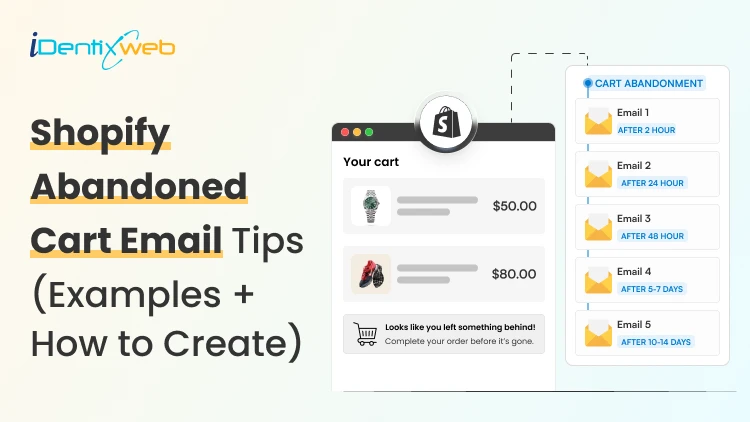

Shopify abandoned cart emails are automated messages sent to shoppers who add products to their cart or begin checkout but leave without completing the purchase. They help recover lost sales by bringing customers back to their cart. To set them up, go to Shopify Admin > Apps > Messaging > Automations, choose the Recover abandoned cart template, customize the email and timing, then turn the automation on.
Roughly seven out of every ten people who add a product to a cart never buy it. That is an actual fact.
The documented average: Baymard Institute puts the online shopping cart abandonment rate at 70.22%.
The good news is that in Shopify, you can send an email notifying customers of their abandoned cart. This is one of the highest-earning automated settings you can turn on.
In Klaviyo's benchmark study of more than 143,000 abandoned cart flows, the abandoned cart flow produced an average of $3.65 in revenue per recipient.
I have set up and rewritten a lot of these flows, and the gap between a store recovering 2% of its carts and one recovering 10% is never the email design. It is all about timing, design, and content.
This guide covers all of it: how to set up abandoned cart emails in Shopify using the current method, the sequence and timing that works, templates, subject lines, the apps worth paying for, and the best practices when writing and sending abandoned cart emails.
What is an abandoned cart on Shopify?
Shopify cart abandonment refers to the situation in which a potential customer adds items to their shopping cart but leaves the website before completing the purchase.
In other words, the customer abandons their shopping cart without going through with the final checkout process and payment.
How to set up Shopify abandoned cart emails?
The current abandoned checkout automation is created and managed in the Shopify Messaging app.
Step 1: From your Shopify admin, go to Apps > Messaging
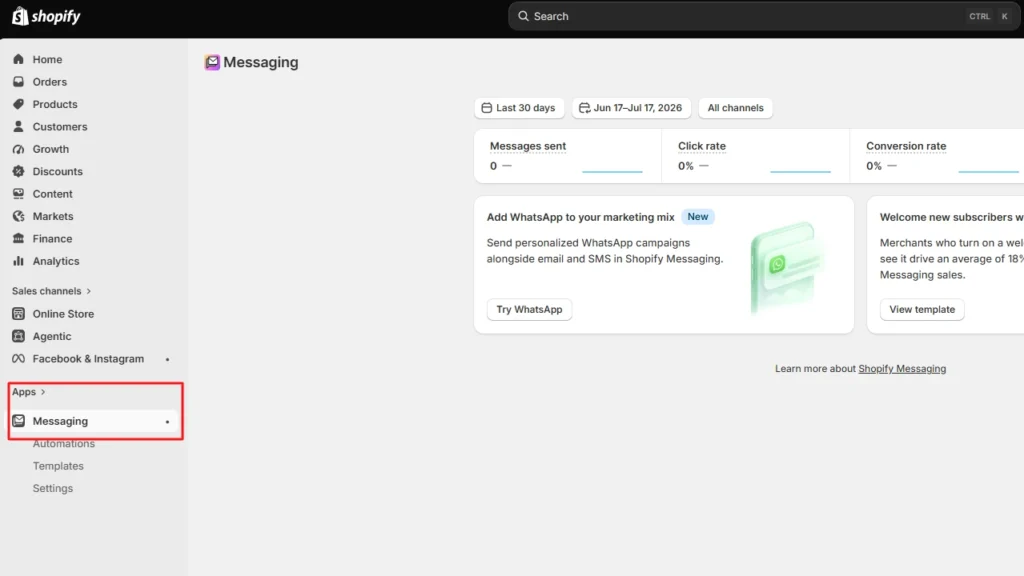
Step 2: Click Automations
Just below Messaging, click on Automations.
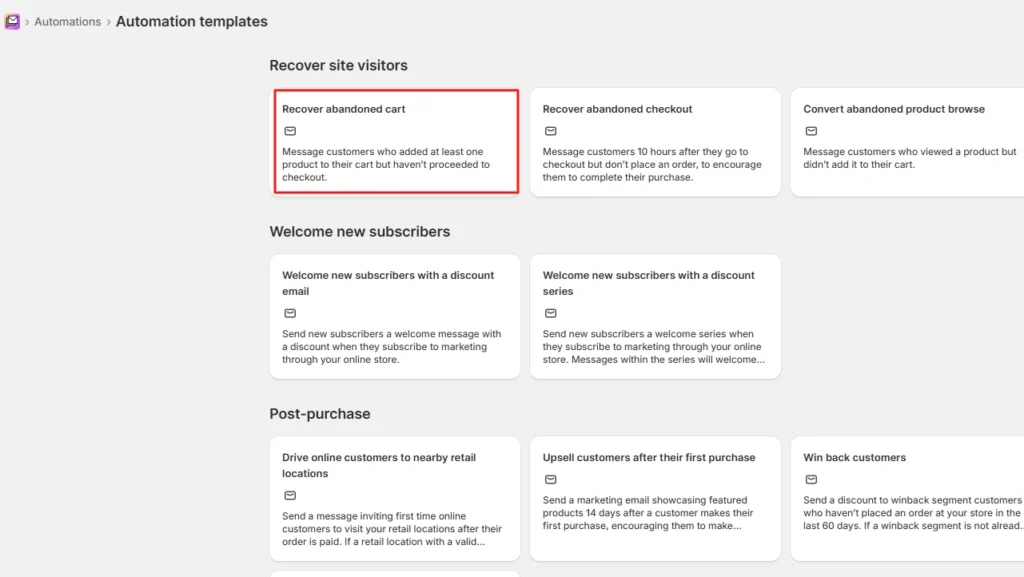
Step 3: Click View templates, then select the Recover abandoned cart template.
Step 4: Click Edit to change the email content
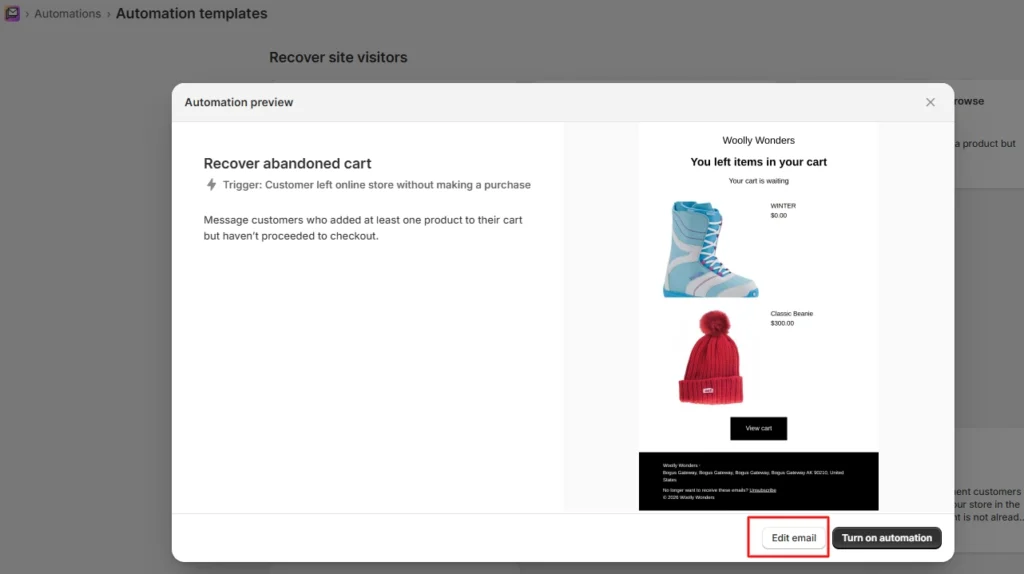
Step 5: Click Turn on automation.
Launch the automation by clicking Turn on automation.
How to customize Shopify abandoned cart email?
- Go to Apps > Messaging > Automations.
- Select the Abandoned checkout automation.
- Click Edit > Edit email, review the notes, then click Continue.
- Beside To:, pick who receives it. Beside Subject:, write your own line. Beside Preview text:, add the snippet that shows after the subject. Beside From:, click Edit to change the sending address.
- Customise the body using the Shopify Email section editor. You can add your logo, change colours, and drop in a discount that applies when the shopper returns to checkout.
- Click Save.
Why my Shopify abandoned cart emails are not sending
This is the support question I get most often, and nine times out of ten the automation is fine. Under the new automation, no abandoned checkout email goes out when:
- The shopper has never completed a purchase with you and is not subscribed to marketing.
- They abandoned, then completed the order themselves before the wait time elapsed.
- None of the items in the checkout are still available to buy.
- Every item is free, and the shopper never reaches the shipping page to add a fee, or shipping is free too.
- The checkout was abandoned inside the Shop app rather than your online store.
- They abandoned a more recent checkout, and that newer wait time has not finished yet.
Shopify abandoned cart email: Best practices
Timely reminders
Send the first abandonment email within a few hours of the abandoned cart. Follow up with additional emails over the next few days if the customer still hasn't completed the purchase. Gradually space out the emails to avoid overwhelming the customer.
Catchy subject lines
Your subject line should be attention-grabbing and relevant. Use personalized elements like the customer's name or the abandoned product to pique their interest.
Compelling content
Make your email content engaging. Showcase the abandoned products, highlight their benefits, and include persuasive calls-to-action (CTAs) that encourage the recipient to complete the purchase.
Clear CTAs
Place a prominent and clear CTA button that leads directly to the cart or checkout page. Use action-oriented phrases like “Complete Your Purchase” or “Get Your Items Now.”
Product image
Include high-quality images of abandoned products to remind customers of what they left behind. Visual cues can reignite their interest.
Value proposition
Remind customers of the unique value your products offer. Whether it’s quality, features, or benefits, emphasize what makes your products stand out.
Urgency and scarcity
Create a sense of urgency by mentioning limited stock or a time-limited offer. Let customers know that their desired items might not be available for long.
Social proof
Add customer reviews, ratings, or testimonials to build trust and credibility. Positive feedback can reassure hesitant buyers.
Abandoned cart recovery link
Include a direct link to the customer’s abandoned cart, making it easy for them to pick up where they left off.
Personalization
Use dynamic content to personalize emails based on the items abandoned, customer’s name, and other relevant information.
The Best Shopify abandoned cart email sequence I use
A single send leaves the majority of recoverable revenue on the table, because different people abandon for different reasons and a single message can only answer one of them.
Three emails inside 72 hours is the structure I default to. Each one does a distinct job.
| Send at | Job | Discount? | |
| 1. The reminder | 1 to 4 hours after abandonment | Assume they got interrupted. Show the products, link straight back to checkout, say nothing else. | No |
| 2. The objection handler | 24 hours after abandonment | Answer the real reason they hesitated: shipping cost, delivery speed, returns, sizing, payment trust. | No |
| 3. The close | 48 to 72 hours after abandonment | Genuine urgency or a modest, time-limited incentive. Last touch. | Optional |
Shopify abandoned cart email template I use
Swap the placeholders for your own merge tags. In the Shopify Messaging editor and in Klaviyo, these are inserted from the editor rather than typed by hand.
Template 1: the reminder (send at 1 to 4 hours)
Subject: {{ first_name }}, your {{ product_name }} is still in your cart
Preview text: It is saved. Two clicks and it is yours.
Hi {{ first_name }},
You left this behind at {{ store_name }}. I saved it for you.
[PRODUCT IMAGE + NAME + PRICE]
[ RETURN TO CHECKOUT ]
If something went wrong at checkout, reply to this email, and I will sort it out.
{{ sender_name }}
Template 2: the objection handler (send at 24 hours)
Subject: Still thinking about the {{ product_name }}?
Preview text: Free returns, and here is what other buyers said.
Hi {{ first_name }},
Your cart is still open. In case you were weighing it up:
- Delivery in [X to Y] working days
- [Free/flat rate] shipping on orders over [amount]
- [X]-day returns, no questions
- Secure payment via [Shop Pay / your gateways]
[PRODUCT IMAGE + NAME + PRICE]
[ONE REAL REVIEW OF THIS PRODUCT, WITH THE REVIEWER'S NAME]
[ COMPLETE MY ORDER ]
{{ sender_name }}
Template 3: the close (send at 48 to 72 hours)
Subject: Last call on your cart, {{ first_name }}
Preview text: [X]% off expires tonight.
Hi {{ first_name }},
I am about to release the items in your cart back to stock.
[PRODUCT IMAGE + NAME + PRICE]
If it helps, here is [X]% off with code [CODE]. It expires in [24 hours].
[ CLAIM IT AND CHECK OUT ]
Not the right product? Reply and tell me what you were actually after.
{{ sender_name }}
Two things I would change about most templates I audit. First, the discount code should be unique per recipient, or it ends up on a coupon site within a week.
Second, if you are going to promise free shipping in email two, make sure your storefront agrees with you.
Do you need an abandoned cart app for Shopify?
Shopify's Messaging is a great app for sending cart abandonment emails. The honest answer on whether you need an app is: it depends on which channel your customers actually respond to, and whether you need to catch people before the email field.
| Capability | Included with Shopify |
| Automated email reminders | Yes |
| Personalised campaigns | Yes |
| Discount offers in the email | Yes |
| Conversion tracking | Yes |
| Automated workflows | Yes |
| SMS notifications | No |
| Web push notifications | No |
| Exit-intent and opt-in pop-ups | No |
| Retargeting ads | No |
| Multi-channel messaging | No |
| Cross-device carts | No |
| Time-limited offers | No |
Tips to optimize cart abandonment emails
When it comes to best practices for abandoned cart emails, several key strategies can greatly enhance their effectiveness. By implementing these tactics, you'll not only recover potentially lost sales but also foster a deeper connection with your audience.
1. Personalization beyond the name
While addressing customers by their names is a great start, consider taking personalization further. Use browsing and purchase history to recommend related products, showcasing your understanding of their preferences.
2. Segment and conquer
Segment your audience based on their behavior, purchase history, or engagement level. This allows you to tailor your cart abandonment email best practices more precisely, resonating with different groups of customers and increasing the chances of conversion.
3. A/B testing for refinement
A/B testing is a powerful tool to fine-tune your cart abandonment email best practices. Experiment with different subject lines, content variations, and CTAs to identify what resonates best with your audience.
4. Mobile optimization
Given the prevalence of mobile shopping, ensure your cart abandonment emails are mobile-friendly. A seamless mobile experience can significantly boost the chances of recipients returning to complete their purchases.
5. Review and optimize
Regularly review the performance of your cart abandonment emails. Analyze metrics like open rates, click-through rates, and cart abandonment rates. Use these insights to refine your strategies over time.
Sending cart abandonment emails is easy but…
If you only do three things from this guide, do these.
Turn on the abandoned checkout automation in Apps > Messaging today, and check the To: field so you are not silently excluding most of the people who abandoned.
Build a three-email sequence at roughly one hour, 24 hours, and 72 hours, and hold the discount back until the last one.
Then go and fix whichever checkout problem is causing the abandonment, because a recovered cart is worth less than a cart that never got abandoned.
FAQs
1. Does Shopify send abandoned cart emails?
Yes. Shopify can automatically send abandoned cart and abandoned checkout emails through Shopify Messaging. It can send them only when the relevant automation is enabled and abandoned checkout recovery is available across Shopify plans.
2. How do I recover an abandoned cart in Shopify?
You can set up a Recover abandoned cart or Recover abandoned checkout automation from Shopify Admin > Apps > Messaging > Automations. For an abandoned checkout, you can also go to Orders > Abandoned checkouts, open the checkout, and manually send the customer their recovery link.
3. How to change abandoned cart email on Shopify?
Go to Shopify Admin > Apps > Messaging > Automations, select your abandoned cart or checkout automation, and edit the email. You can change the subject line, preview text, sender details, text, branding, colors, product sections, and other email content before saving the automation.
4. How do I set up abandoned cart emails on Shopify?
Go to Apps > Messaging > Automations, click View templates, select the Recover abandoned cart template, then click Turn on automation and confirm.
5. Why are my Shopify abandoned cart emails not sending?
The shopper is not subscribed to marketing and has never purchased before. They completed the order before the wait time elapsed. The items are no longer available. The checkout was abandoned in the Shop app rather than your online store, or a newer abandoned checkout reset the timer.
6. Do I need an abandoned cart app for Shopify?
Not to get started. Shopify's built-in recovery covers automated email, personalisation, discounts, and conversion tracking at no extra cost. You need an app when you want SMS or WhatsApp, multi-step sequences without building them in Flow, segmentation by cart value, or the ability to reach shoppers who left before entering an email address.
About the author
Sajini Annie John
Meet Sajini, a seasoned technical content writer with a passion for e-commerce and expertise in Shopify. She is committed to helping online businesses to thrive through the power of well-crafted content.